Swift-Switch
this site the web

Recent Photos

image
image
image

Ocean Screenshots

3 Work in progress screenshots of my new VRay OceanMtl version 2.

New Settings for Swift-Switch

Here is a screenshot of the new "Preferences" from v5.4 of Swift-Switch.

Some settings might change when full version is released
The settings you see here are saved in a INI file, so everytime you switch render engines these settings are loaded. For example, if you turn on "Enable VFB" in "V-Ray" then everytime you switch to V-Ray using Swift-Switch, V-Ray VFB will be turned on.

Many users reported that Swift-Switch resets V-Ray when switching and they lose Environment settings and Color Mapping settings. Well from v5.4 you have the option to "Completely Reset V-Ray". If you disable this option then V-Ray Environment and Color Mapping settings will not reset when switching to V-Ray using Swift-Switch.

VFB+ will be available in Swift-Switch

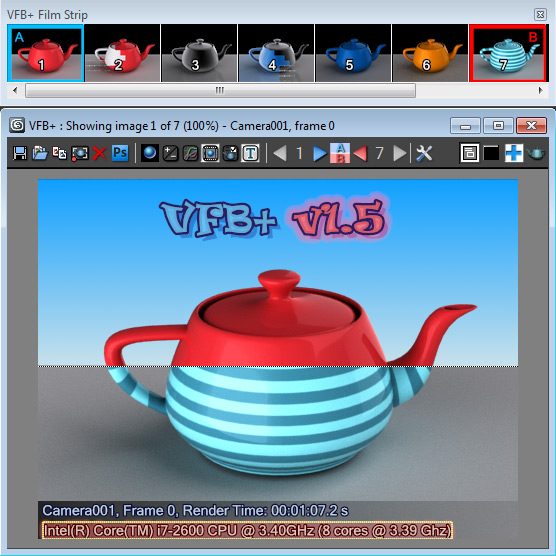
Most of 3dsmax users know about this awesome script done by Rotem Shiffman. Its called VFB+: A Feature-rich Extension to the 3dsmax Frame Buffer. I recently contacted Rotem and he was kind enough to let me include VFB+ with Swift-Switch. So from next version of Swift-Switch, you have the option to install VFB+.

Here is a screenshot of VFB+ (Image from ScriptSpot)


Concept
I felt the 3dsmax VFB toolbar has not been changed in literally a decade, and is very lacking in features, while on the other hand, has a lot of useless features (who would print a render straight out of the VFB?). I set out to replace the toolbar with something much more useful in everyday production work, especially for look developers, shaders, lighters, render artists, and generally anyone who finds themselves doing lots of test renders.

Features:
  •  Render History - navigate through all of the current session's renders.
  •  Embedded UI - sits straight inside the VFB, no wasted screen space. Fully compatible with all original VFB features (zooming, scrolling, region editing, pixel color information, etc.)
  • Color Correction - perform color correction straight in the VFB using on-screen controls.
  • Split A/B Mode - compare between any two renders from the history (RAM player style).
  • Render Settings Browser - compare render settings between different renders, and optionally revert to previous settings.
Compatibility:
  •  Tested on 3dsmax 2009 and upwards, unknown about previous versions.
  • Any renderer which uses the 3dsmax VFB.
Limitations:
  • Frame buffer is currently 32BPP only.

V-Ray Save Passes

Here is a screenshot of my new script that will be released with next version of Swift-Switch.

As you can see...it lets you save V-Ray Irradiance Map pass and Light Cache pass for later use.

Idea by: Said Mohamed Rahmani

Cebas Final Render Parameters in Swift-Switch

Cebas Final Render Settings in Swift-Switch.

Click for Larger view
When you switch to V-Ray, settings will be replaced with V-Ray settings.

VRay Ocean BETA Submission (Closed)

BETA Submission is over. Thank you to all those who have submitted. Please use the feedback form to submit your feedbacks on VRay OceanMtl version 2.

Regards,
Satheesh (RyanJon2040)

VRay OceanMtl version 2

Here are some screenshots of Vray OceanMtl version 2 applied to Ocean Geometry.

Click for larger view


About Swift-Switch

Swift-Switch is an Advanced Render Switcher for Autodesk 3dsmax.It contains Render Presets for both V-Ray and Mental-Ray and includes more functions.